

Ask around Mac users and you hear the same complaint more often than Cupertino likes to admit: you type the name of a file that is already on the computer, and the search that comes with the Mac answers with websites, suggestions, apps, and “helpful” matches that are not the document you wanted.
That frustration is not obscure. Forums, Reddit threads, and support pages are full of people asking why local search feels mixed up with the web, why a PDF on the desktop is harder to reach than a suggested site, and why finding a file by name takes more steps than it used to. The pattern is simple enough that almost anyone who uses a Mac for work recognizes it.
What people actually want
Most of the time they are not asking for an assistant. They are asking for a file. A contract. A photo. A spreadsheet saved last week with a name they almost remember. They want to type that name, stay on the Mac, and open the result.
The built-in search on macOS has grown into something broader: web results, suggestions, and related items sit next to—or in front of—the files on the disk. Apple presents that as convenience. For many users it reads as noise. When the tool that used to mean “find this on my computer” starts behaving like a portal to everywhere else, trust drops fast.
A small app with a plain job
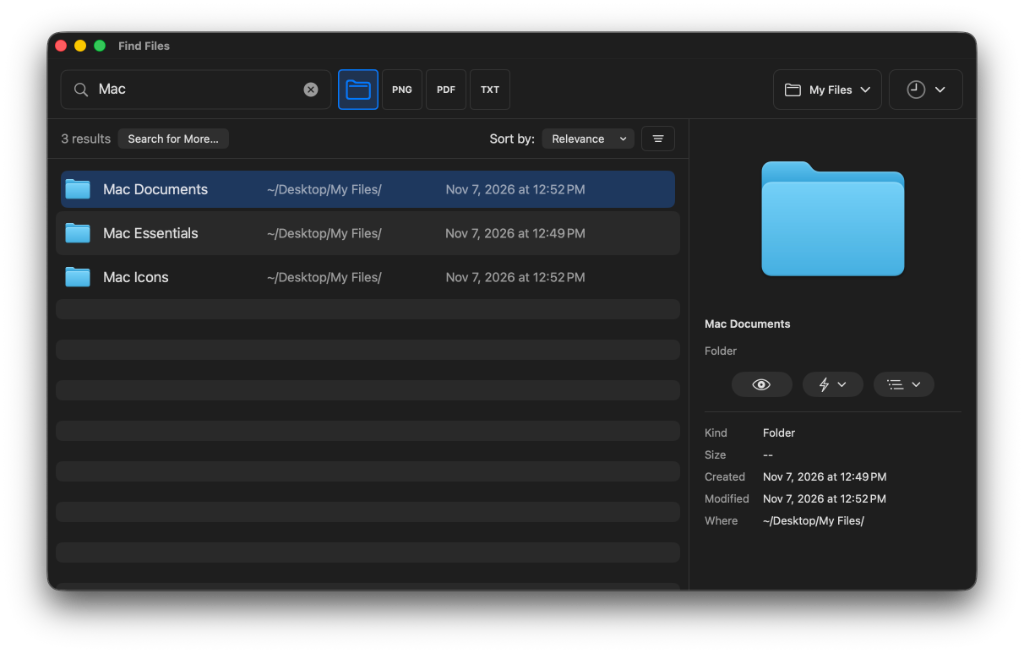
That is the gap Find Files was built for. The idea is intentionally ordinary: search your Mac by file name, without web results and without turning every query into a pile of unrelated suggestions. Search the whole computer or one folder. See location, size, and dates so you can tell similar names apart. Open the file, or show it in its folder.
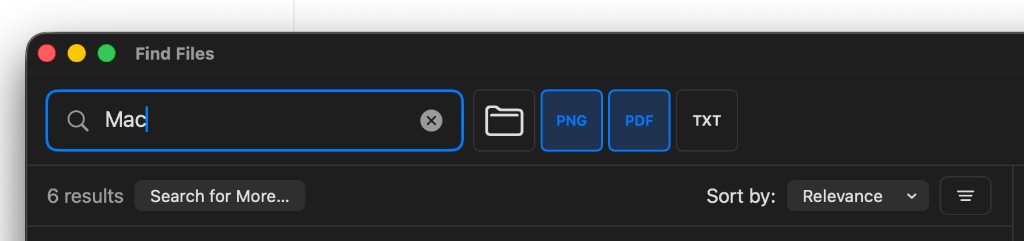
After you search, filter results by file type. Select a type, such as PDF or image, to show only those files.
The change behind the tool
The interesting shift is not another “AI search” pitch. It is the opposite: a return to a job description people already understand. Find the file. Stay on the Mac. Do not pretend every search should also be a web session.
Apple can keep making system search smarter, broader, and more suggestive. Users can still want a quieter path for the everyday case—the file that is already here. Find Files is that path: short, named for what it does, and built around the complaint Mac users keep posting in plain language.
Try Find Files: https://www.altomac.com/findfiles/
The final question
When you type a file name on your Mac, should the first answer be the file—or everything else the computer thinks you might mean?